


An SMS popup asks for a phone number and explicit permission to send marketing texts, usually in exchange for a relevant offer. Below are seven examples: three documented SMS brand cases and four illustrative design patterns. The design patterns are not claims about a brand’s current live popup or measured conversion rate. The guide also covers building a Shopify flow, placing consent before the signup action, connecting an SMS provider, and measuring quality as well as list growth.
- Documented SMS outcomes are labeled separately from email results.
- Use a single clear offer and optional SMS consent.
- Preview the phone layout and verify integration records before launch.
Essence Vault reports 33% email and 26% SMS opt-in rates, with 360,000 emails and 285,000 phone numbers collected in one month. Three-month totals were 514,000 emails and 403,000 phone numbers; those totals are channel records, not deduplicated people.
TL;DR
- An SMS popup collects a phone number and SMS-specific marketing consent.
- Email-first and SMS-first flows serve different goals; test the order rather than assuming a universal winner.
- Show the offer after relevant engagement and keep it easy to dismiss.
- Put the required disclosure before the consent button, and keep a record of the permission given.
- Use documented SMS results as examples, not promises or an industry average.
What Is an SMS Popup?
An SMS popup is an on-site overlay that requests a phone number and separate permission for text marketing. It can appear alone or after email capture. With Alia, email and phone collection can be configured within the same campaign; keep each channel’s consent clear and optional.
An SMS popup differs from an email form in the contact method, channel-specific consent, and follow-up experience. An email signup does not authorize marketing texts, and a phone number alone is not SMS consent. Put the disclosure where it is read before the user agrees. Follow your provider’s requirements for the applicable country, sending number, and message type.
A two-step flow can collect email first, then offer a separate optional SMS step. Visitors who decline texts can still complete email signup. Alia supports multi-step capture and Smart Triggering for behavior-based re-engagement. Test the full flow in your connected provider, including unconfirmed and declined subscriptions.
For the complete flow, see how to capture email and SMS in one popup.
Are SMS Popups Worth Adding to Email Capture?
An SMS popup can build a second permission-based channel from existing traffic when your team has a useful text program ready. It also adds messaging cost, consent obligations, and another subscription to manage. Start with the channel you can serve well, make the value clear, and assess revenue after discounts and sends rather than relying on unsupported open-rate claims.
Essence Vault reports 33% email and 26% SMS opt-in rates, with 360,000 emails and 285,000 phone numbers collected in one month. Three-month totals were 514,000 emails and 403,000 phone numbers; those totals are channel records, not deduplicated people.
Email and SMS offer separate ways to follow up. Choose an offer and frequency people actually want, then measure engagement, unsubscribes, and revenue for each channel.
7 SMS Popup Examples and Design Patterns
The three brand cases below have published SMS outcomes. Four additional entries illustrate copy and layout approaches without claiming a current live implementation or a measured lift. Related email examples are labeled as such so they do not become SMS benchmarks.
Fashion & Beauty SMS Popups
Fashion and beauty brands face unique challenges in SMS collection—customers expect personalized recommendations while maintaining privacy about their preferences. The following examples show how leading brands overcome these challenges.
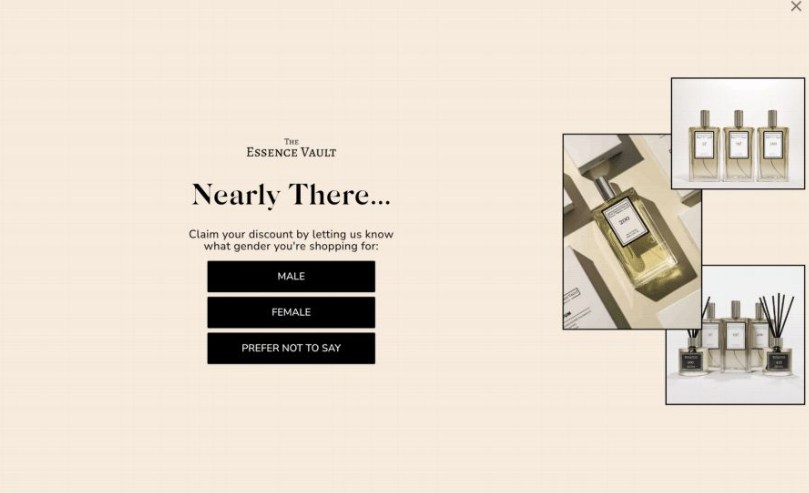
Example 1: Essence Vault — Email and SMS in One Campaign
Essence Vault combines preference collection with email and SMS acquisition. The published case study describes audience segmentation and BFCM scale. Check the actual flow and consent in your implementation rather than copying an unverified trigger setting.
What to borrow from the documented campaign:
- Collect a useful preference answer, then use it in follow-up segmentation.
- Keep email and SMS permissions distinct.
- Preserve readable disclosure and a clear close action on mobile.
- Test the offer and trigger using your own traffic.
Essence Vault reports 33% email and 26% SMS opt-in rates, with 360,000 emails and 285,000 phone numbers collected in one month. Three-month totals were 514,000 emails and 403,000 phone numbers; those totals are channel records, not deduplicated people.
Postscript's system was fairly limited in design, which held us back from truly maximizing our sign-up rates. We thought we were doing fine, as it matched the industry average.
"But Alia really opened my eyes to what was possible. We collected 290,000 zero-party data submissions from our shoppers"

Example 2: High-Contrast SMS Offer (Illustrative Pattern)
Use a simple background, readable offer, and one clear consent action. This illustrative pattern emphasizes clarity rather than a specific live brand campaign. Use a discount only if your margin supports it.
Implementation details:
- Trigger: test engagement timing rather than copying an unverified five-second setting.
- Input: one phone field with an appropriate country selector and telephone keyboard.
- Consent: SMS-specific disclosure before the button.
- Brand: apply your own colors and check text contrast.
Contrast and a short form can make the next action easier to understand; test whether they improve completion for your audience.
Health & Wellness SMS Popups
Health and wellness brands must balance education with conversion, often needing to explain complex products while maintaining user engagement. These examples showcase effective approaches to this challenge.
Example 3: Gardencup — Separate Email and SMS Acquisition
Gardencup’s Alia campaign combines subscriber growth, preference-led segmentation, and ongoing testing. The case study documents email and SMS results, including a test that removed imagery on mobile.
Gardencup reports 124% more email subscribers, 177% more SMS subscribers, and 76% higher welcome-flow revenue after switching to Alia. The published case study includes testing the removal of imagery on mobile.
Related email-capture lesson from Batch CBD:
- Ask one actionable intent question before contact collection.
- Keep answer options concise.
- Save the answer to the subscriber profile for relevant follow-up.
- Measure each funnel stage independently.
Batch CBD reports email signups rising from 10% to 36%, a 43% purchase rate after signup, and 92% learning-flow completion. These are different funnel measures; the 36% figure is not an SMS opt-in benchmark.
The Batch CBD testimonial below relates to email acquisition and learning-flow results; it is not evidence of a 36% SMS opt-in rate.

Batch CBD’s 92% figure refers to learning-flow completion, not popup opt-in or SMS conversion. Keep the denominator attached to each reported rate.
Example 4: A Single-Field SMS Form (Illustrative Pattern)
A single phone field can keep the first screen focused. This illustrative pattern uses a visible country selector, a telephone keyboard, readable disclosure, and an obvious dismissal option.
Design elements:
- Minimal visual clutter and readable brand colors.
- One phone field with clear formatting and error messages.
- A country selector the visitor can correct.
- A specific, truthful benefit and separate SMS consent.
Use this when SMS is the primary goal, and compare it with an optional phone step after email capture.
Sleep & Wellness SMS Popups
Sleep and wellness campaigns can explain the benefit of subscribing before asking for a phone number. The Hostage Tape case below has documented SMS results; the related food-brand example is labeled separately as an email campaign.
Example 5: Hostage Tape — Explain the Value of Subscribing
Hostage Tape reports a 25% email opt-in rate, 20% SMS opt-in rate, 245% higher email welcome-flow revenue, and $86K in additional revenue over two months.
Elements to adapt from a clear value-led campaign:
- Lead with the real incentive and what subscribers will receive.
- Explain the product or brand where useful, without obscuring the form.
- Keep phone permission optional and distinct from email.
- Measure the resulting welcome-flow revenue separately by channel.
Related educational email example: Urban Smokehouse
- The existing campaign example uses brand storytelling and an educational journey.
- The figures below are reported popup/email campaign results, not an SMS-specific conversion rate.
- Use only genuine reward deadlines; do not copy a timer whose terms are unverified.
Urban Smokehouse’s published case study describes a 9.5% popup signup rate and later sales. Treat those as campaign-level outcomes, not SMS-only results.
Education is useful when it answers a real product question. Avoid requiring an unnecessary story or lesson simply to obtain a promised offer.
Example 6: Channel Choice (Illustrative Pattern)
Offer email and SMS as separate choices with clear benefits for each. A visitor should be able to choose email without agreeing to texts. The right flow depends on your audience and marketing program.
Key features:
- Separate email and phone steps or clearly distinct consent actions.
- Explain what each subscription includes.
- Use a real incentive with stated conditions.
- Preview the flow on phones and validate channel-specific consent.
Channel choice gives visitors control. Measure completion, engagement, and unsubscribe behavior rather than assuming more collected fields mean a better list.
Home & Lifestyle SMS Popups
Home and lifestyle brands focus on building trust and addressing common concerns about SMS marketing, particularly around spam and message frequency.
Example 7: Clear Frequency and Opt-Out (Illustrative Pattern)
Explain the actual text program and how to leave it. This illustrative pattern focuses on a clear value exchange, a readable frequency disclosure, and an effective opt-out process.
Trust-building elements:
- State the actual message types and frequency disclosure your provider requires.
- Use readable opt-out and help instructions where required.
- Keep marketing consent optional and separate from email.
- Promise only benefits the program delivers.
Design specifications:
- A readable single-column layout.
- Your own brand typography and colors.
- Only the information needed for the subscription.
- Disclosure and terms appropriate to the market and provider.
A “no spam” slogan does not replace a clear program description, valid consent, or an effective opt-out process.
How Do You Design an SMS Popup That Converts?
Make the offer understandable, keep the first action focused, and place readable SMS disclosure before the consent action. Use a compact phone layout, a suitable keyboard, and an obvious close control. Smart Testing can run an approved plan comparing variants; measure both subscriber quality and signup volume.
Visual Design Best Practices
Treat these as design checks to validate, not a formula for a particular opt-in rate:
| Element | Design check | Avoid |
|---|---|---|
| Controls | Comfortable, well-spaced tap targets | Tiny or ambiguous actions |
| Text | Readable text and applicable WCAG contrast | An invented “70% contrast” rule |
| Fields | A focused phone step with separate consent | Bundled email/SMS permission |
| Layout | Compact, responsive, content accessible | A desktop takeover reused on a phone |
| Performance | Measure added weight and real-device responsiveness | An unsupported universal loading-time guarantee |
Mobile-first implementation details:
- Thumb zone optimization: Place primary CTA within easy reach (bottom 1/3 of screen)
- Single-column layout: Avoid horizontal scrolling on any device
- Touch target spacing: Minimum 8px between interactive elements
- Readable contrast ratios: 4.5:1 minimum for normal text, 3:1 for large text
How Do You Write SMS Popup Copy That Gets Signups?
State the benefit in a few words, describe the actual text program, and make the consent action clear. A phone number can feel like a larger commitment than an email address. Use truthful frequency, verified social proof, and readable terms instead of adding urgency or claims you cannot support.
The HVCTS Framework:
- Hook: Clear benefit in 3-5 words ("Get 15% Off")
- Value Prop: What they receive ("VIP text alerts + exclusive deals")
- Compliance: Transparent frequency ("2-3 texts/week max")
- Trust Signal: Easy exit option ("Reply STOP anytime")
- Social Proof: Subscriber count or testimonials ("Join 50K+ insiders")
Copy examples with psychological triggers:
- "Get 15% off + VIP text alerts" (benefit + exclusivity)
- "Join 50K+ insiders for flash sales" (social proof + FOMO)
- "Text me deals (2-3x per week max)" (frequency transparency)
- "Exclusive mobile-only discounts" (channel-specific value)
- "First access to new arrivals" (time-based exclusivity)
Use your real subscriber count in sample social-proof copy, and describe your actual send frequency. The examples are not permission to invent numbers.
Learn how to write high-converting popup messages, with examples.
Advanced SMS Popup Strategies
The next strategies are hypotheses to test, not guaranteed multipliers for SMS collection.
When Should an SMS Popup Appear?
Show an SMS ask after relevant engagement. A 15–30-second active delay or about 50% scroll can be a starting mobile test; the right choice depends on page and source. Desktop exit intent is a separate option. Phones have no cursor, so desktop mouse-out detection does not apply. Scroll changes and inactivity can inform a mobile trigger, but they also occur during normal browsing. Back navigation and tab visibility changes may be observed only after the visitor has left; they cannot reliably display a visible popup before departure. Keep navigation working normally and test engagement-based triggers earlier in the session.
Optimal trigger settings by device and behavior:
| Trigger | Test condition | Watch for |
|---|---|---|
| Scroll | About 50% depth on a relevant page | Short or long pages need different treatment |
| Time | 15–30 seconds of active mobile browsing as a starting hypothesis | Background tabs and distracted visits |
| Desktop exit | Qualified upward cursor movement | False positives and repeated offers |
| Page-specific | After useful product or category context | Interruption of checkout |
| Returning visitor | A conservative cap or different message | Failure to recognize an existing subscriber |
Implementation guide for each trigger:
- Keep the offer steady while comparing timing.
- Use separate phone and desktop rules.
- Avoid interrupting checkout.
- Apply suppression and frequency controls.
- Read the mobile exit-intent limitations.
Smart Triggering supports behavior-based re-engagement. MiHIGH reports email opt-ins rising from 6% to 18% and $600K in sales over 30 days. The case study covers the broader popup program, not an isolated mobile design or trigger test.
MiHIGH saw 5X more signups per day and $600K in revenue after rethinking popups with Alia
EMAIL OPT-IN RATE (UP FROM 6%)
MORE SIGNUPS PER DAY
IN SALES IN 30 DAYS

Alia completely changed how we approach popups — turning a standard opt-in into an engaging, educational experience. The results were immediate: higher sign-ups, more conversions, and $600K in sales in just 30 days.
Install Alia
Launch your first popup
Keep optimizing your opt-in rate
Do Two-Step SMS Popups Convert Better Than Single-Step?
Sometimes. An email-first flow can preserve email completion while offering a separate optional SMS step. A phone-first flow may suit an SMS-led program. Compare both with your own traffic and a clearly defined denominator; there is no supported universal 35–50% or 67% improvement. Gardencup reports 124% more email subscribers, 177% more SMS subscribers, and 76% higher welcome-flow revenue after switching to Alia. The published case study includes testing the removal of imagery on mobile.
The Progressive Value Framework:
Step 1: Low-commitment entry
- Email + small discount (10%)
- Single field, minimal friction
- Immediate value delivery
Step 2: Higher-value upgrade
- Phone number + larger discount (15-20%)
- Position as "VIP upgrade"
- Additional exclusive benefits
Implementation best practices:
| Element | Step 1 Requirements | Step 2 Requirements |
|---|---|---|
| Progress Indicator | "Step 1 of 2" with visual bar | "Final step" with completion emphasis |
| Visual Consistency | Same brand colors and fonts | Maintain design continuity |
| Value Escalation | 10% discount + email updates | 20% discount + SMS alerts |
| Exit Options | "Skip for now" button | "Complete signup" vs "Email only" |
| Completion Time | Under 5 seconds | Under 10 seconds total |
Gardencup’s case study documents subscriber growth, segmentation, and mobile image testing. It does not establish a universal “mystery discount” mechanism or quantify the effect of a single step order.

The key insight: Frame step 2 as an upgrade, not an additional requirement. Use language like "Unlock VIP benefits" rather than "Please provide your phone number."
How to Create an SMS Popup on Shopify (Step by Step)
To create an SMS popup on Shopify, install the popup app, choose the offer and format, configure consent before the signup action, set targeting, connect the sending platform, and test before publishing. The six steps below cover that workflow.
1. Pick the offer
Choose one incentive, such as a discount, early access to drops, or a free shipping threshold. Match it to your average order value so the offer feels worth a phone number.
2. Choose the format
Use a two-step flow (email first, phone second) if you want to protect email capture. Use a single-step SMS popup if text is your primary revenue channel.
3. Write the copy and the consent line
Lead with a truthful benefit, keep the form focused, and put the required SMS disclosure above the consent button. Alia provides an SMS consent text variable with your legal business name and terms/privacy links; verify its rendered wording and styling for your provider and market.

4. Set the trigger
Choose an engagement trigger and use Advanced Targeting for device, page, source, and audience rules. Preview accidental triggers and repeated exposures.
5. Connect your SMS platform
Connect Klaviyo SMS, Attentive, or Postscript. Submit a test signup and verify channel consent, source fields, welcome-flow routing, and confirmation status in the provider.
6. Publish, test, and let it learn
Preview the exact mobile flow, including the keyboard and disclosure. Review and approve a Smart Testing plan and use Prism AI for personalized experiences. Continue reviewing creative, offer economics, and subscriber quality.
Basic plans start at $100/month for up to 20,000 monthly visitors; Fully Managed starts at $400/month for up to 50,000. Compare plans for your traffic.
SMS Popup Compliance (TCPA, 10DLC, Double Opt-In)
Collect SMS-specific permission with clear disclosure before the signup action and keep evidence of what the visitor agreed to. Alia offers configurable consent text; it does not remove your responsibility to verify regional, provider, and carrier requirements. Klaviyo’s consent guidance explains separate permission and disclosure placement.
- Separate permission: email consent or possession of a phone number does not authorize marketing texts.
- Disclosure: name the business and text program, link mobile terms and privacy information, and show required frequency, rate, and opt-out information before consent.
- Evidence: retain the consent timestamp, source, and form version or wording; verify what your integration stores. Alia’s Klaviyo synced-properties documentation describes consent and source records.
- Sending setup: complete the provider’s registration and verification for your number type and destinations; US local-number 10DLC registration is a sending requirement, not proof of consent.
- Double opt-in: requirements depend on the flow and provider. Klaviyo describes it as a US carrier requirement for cart-abandonment texts. Verify the confirmation flow before sending.
Read the Shopify SMS opt-in guide and check the current requirements with your SMS provider and counsel.
Which SMS Platforms Should Your SMS Popup Integrate With?
Use the platform that sends your texts and confirm how the popup hands off phone numbers, consent, and campaign source. Alia supports Klaviyo, Attentive, Postscript, and Omnisend. Integration capabilities differ; verify the actual subscription state and fields instead of assuming identical records or guaranteed delivery in seconds.
Platform Integration Best Practices
Validate the connection and subscriber journey using a real test submission before launch.
Major SMS platform integrations and capabilities:
| Platform | Use in the workflow | Setup reference |
|---|---|---|
| Klaviyo SMS | SMS and email profiles and flows | Klaviyo integration |
| Attentive | SMS subscription and messaging | Attentive integration |
| Postscript | Shopify-focused SMS messaging | Postscript integration |
| Omnisend | Email and SMS automation | Omnisend integration |
Technical implementation checklist:
Confirm channel-specific consent and retained evidence.
Test required confirmation and pending-consent handling.
Test the welcome message and promised reward after valid subscription.
✅ Unsubscribe mechanism: One-word STOP functionality
✅ Data sync verification: Real-time contact synchronization testing
✅ Mobile responsiveness testing: Cross-device functionality validation
Integration workflow example:
- Visitor submits the phone number and SMS consent.
- Integration creates or updates the provider profile and subscription state.
- Any required confirmation completes before marketing sends.
- The subscriber enters the intended welcome flow.
- The source and relevant preference fields are available for segmentation.
Use the setup links above, then verify a successful, declined, and unconfirmed signup in your own account. For Postscript Onsite Opt-In, follow Alia’s OOI guide for the specific consent placement, verification, and flow-filter requirements.
How Do You Make an SMS Popup Mobile-Friendly?
Design the phone version around a compact form, a suitable keyboard, readable disclosure, and a close control within reach. Mobile popup best practices covers sizing and Google’s interstitial guidance explains content access.
Mobile-first design principles with exact specifications:
| Element | Check |
|---|---|
| Touch targets | Comfortable and well separated; around 44×44 CSS pixels is a useful design target |
| Text | Readable at normal and enlarged text sizes |
| Layout | Responsive to small screens and the on-screen keyboard |
| Performance | Measure before/after page impact on actual phones |
| CTA and consent | Both visible before submission; no device-control overlap |
Mobile testing protocol:
Device testing requirements:
- Test a small and a large supported iPhone and Android phone.
- Check mobile Safari and Chrome and your supported browsers.
- Test a slower network and device, as well as Wi-Fi.
Interaction validation checklist:
- Touch interactions respond within 100ms
- Form submission works without keyboard issues
- Popup positioning doesn't block critical content
- SMS delivery confirmation displays properly
- Error states provide clear guidance
Performance optimization:
- Defer noncritical assets where the platform supports it without delaying essential trigger listeners.
- Compress responsive images and measure the added page weight.
- Keep interactions responsive on a slower phone and connection.
- Check the complete consent and submission journey.
Keep your popup small enough that it never blocks the page, since Google's guidance on intrusive interstitials recommends small banners over full-page overlays.
How Do You Measure SMS Popup Performance?
Measure SMS opt-in rate as completed, consented phone signups divided by people shown the relevant SMS step. Report email separately, and state whether the denominator is all visitors, popup viewers, or phone-step viewers. Essence Vault’s reported 26% SMS rate is a campaign example, not an industry benchmark.
Key Metrics to Track
Success in SMS popup optimization requires tracking the right metrics at the right frequency. Here's the complete measurement framework:
Use these definitions and your own baseline:
| Metric | Definition / check | Frequency |
|---|---|---|
| SMS opt-in rate | Confirmed or valid consented SMS signups / defined exposure denominator | Review after launch and by cohort |
| Click-through rate | Use the provider’s definition and consistent denominator | By campaign |
| Revenue per SMS | Net attributed revenue / messages, with stated window | By campaign and cohort |
| List growth | Net additions after unsubscribes and invalid numbers | By period |
| Unsubscribe rate | Use a consistent delivery or subscriber denominator | By send and cohort |
| Delivery rate | Delivered / attempted sends, using provider definitions | By send |
Advanced tracking implementation:
Revenue attribution setup:
- UTM parameter tracking for SMS-driven traffic
- Unique discount codes for each popup campaign
- Customer lifetime value analysis by acquisition source
- Cross-channel attribution (SMS + email combined impact)
Segmentation analysis:
- Opt-in rate by traffic source (organic, paid, social)
- Performance by device type (mobile vs desktop)
- Geographic performance variations
- Time-of-day and day-of-week optimization
How Do You A/B Test an SMS Popup?
Start with the offer, then timing, copy, and layout. Change one important variable at a time when you need to understand its effect. Choose a primary metric and minimum effect worth detecting before launch. Size the test from your baseline rate, traffic, and desired statistical power; a fixed visitor count or two-week duration does not guarantee a reliable result. Cover relevant business cycles, avoid stopping at the first apparent winner, and check revenue and unsubscribes alongside signups.
Testing priority matrix:
| Priority | Example | Measure |
|---|---|---|
| Offer | Compare sustainable rewards or early access | Net revenue and valid subscribers |
| Timing / copy | Compare engagement trigger or value wording | Completion, close rate, and subscriber quality |
| Design | Compare compact layout or imagery | Usability and purchases |
Sample A/B test setup with implementation details:
Test hypothesis: "20% off discount will outperform 15% off discount for SMS signups"
Test configuration:
- Assign traffic randomly to a control and variant.
- Define the primary metric and minimum meaningful effect.
- Plan sample size and duration from the baseline and traffic.
- Check revenue and unsubscribe outcomes as guardrails.
Statistical requirements:
- Minimum 95% confidence level
- Statistical power of 80%
- Account for multiple testing with Bonferroni correction
- Monitor for novelty effects in the first week
Smart Testing runs an approved testing plan and Prism AI adapts experiences from performance data. Hostage Tape reports a 25% email opt-in rate, 20% SMS opt-in rate, 245% higher email welcome-flow revenue, and $86K in additional revenue over two months.
Having Alia's team help us run A/B tests has been huge. Instead of guessing what works, we get real-time insights and optimizations that actually improve performance.
"Sign-ups are up, our welcome flow is generating serious revenue, and we're finally seeing the ROI we were hoping for"
When Should an SMS Popup Ask for the Phone Number First?
Ask for phone first when text is the primary program and the offer suits it; ask for email first when email is the main goal. Both orders should keep channel consent separate and allow a visitor to decline. Test the order rather than treating SMS-first as a proprietary method or a proven multiplier.
The Reverse Collection Method
A phone-first variation to test:
Framework implementation:
Step 1: SMS-first positioning
- Describe the actual SMS benefit, such as first access to a sale.
- Use a truthful deadline or access window.
- Collect the phone number with SMS-specific disclosure.
- Offer email as a separate optional next step.
Step 2: Email as value-add
- Upgrade language: "Want detailed style guides too? Add your email"
- Additional benefits: "Get sizing charts + care instructions"
- Optional positioning: Frame as enhancement, not a requirement
Why this psychological approach works:
- An SMS-led flow may suit a genuine time-sensitive program.
- A single focused input can make the first action clear.
- Separate optional email capture can follow.
- Compare signup quality and unsubscribe behavior rather than assuming that a phone-first flow wins.
🎯 Discover more gamification strategies that increase customer loyalty and long-term engagement beyond the initial signup.
Cross-Device SMS Popup Synchronization
A person may visit on more than one device, but anonymous browser storage does not automatically connect those sessions. Design suppression and follow-up around identifiers and permissions actually available to your tools.
The Multi-Device Challenge and Solution
The cross-device problem:
- User sees popup on mobile, dismisses it
- Later visits on desktop, sees same popup again
- Creates negative experience and popup blindness
- Misses opportunity for device-specific messaging
Advanced solution framework:
How Returning Subscribers Are Recognized
Recognize known subscribers using available cookies and campaign UTMs, then suppress repeat signup requests where identification works. Cleared cookies, blocked tracking, and another device can prevent recognition; suppression is not guaranteed across devices.
Contextual messaging strategy:
| Context | Possible experience | Limit |
|---|---|---|
| New phone visitor | A relevant optional SMS offer | No existing identity assumed |
| Recognized returning visitor | A different message or no signup ask | Depends on available identifiers and consent |
| Known subscriber | Suppress acquisition prompt or offer useful content | Another device may not be recognized |
Technical implementation steps:
- Confirm the identification signals your provider actually supports.
- Respect tracking and consent choices.
- Suppress acquisition prompts when an existing subscription is recognized.
- Test without assuming cross-device recognition.
Example workflow:
- A visitor signs up on one device.
- Known identifiers may let a later visit suppress the acquisition form.
- If identification is unavailable, use conservative frequency and a clear dismissal option.
Evaluate recognition and repetition with your own integration rather than assuming a fixed cross-device conversion lift.
SMS Popup FAQs
What is an SMS popup?
An SMS popup is an on-site form that collects a phone number and separate permission for marketing texts. It can be a standalone phone flow or an optional step after email. Alia supports multi-step capture and integrations with SMS providers; disclosure must be readable before the consent action.
Do SMS popups need double opt-in?
It depends on your provider, destination, number type, and message flow. A confirmation strengthens verification, and Klaviyo describes double opt-in as a US carrier requirement for cart-abandonment texts. Configure the provider’s supported confirmation flow and keep consent evidence; do not assume an email confirmation covers SMS.
What is a good SMS popup conversion rate?
Compare your own baseline using the same denominator, traffic mix, and confirmation status. Essence Vault reports a 26% SMS opt-in rate; Gardencup reports 15.8%, and Hostage Tape reports 20%. These are brand campaign results, not guaranteed outcomes or industry averages.
What makes Alia useful for SMS capture?
Alia combines email/SMS flows, configurable consent copy, marketing integrations, and ongoing optimization. Smart Testing runs a plan you review and approve, Smart Triggering supports re-engagement, and Advanced Targeting controls audiences. Basic starts at $100/month; Fully Managed starts at $400/month. Compare plans.
Compare the workflows in our SMS capture tools guide.
How do I grow my SMS marketing list?
Offer something your audience values, ask at a relevant moment, keep SMS optional, and test one focused change at a time. Monitor unsubscribes and net revenue as well as new phone numbers. Avoid importing email permission into SMS or treating a discount as proof of consent.
Explore 11 ways to grow your SMS list for additional acquisition ideas.
Can one popup collect both email and phone numbers?
Yes. An email step followed by a separate optional phone step is one approach. Alia supports multi-step collection; Essence Vault’s case study reports 33% email and 26% SMS opt-ins in its broader program. Keep the permissions distinct and validate the subscription state in each provider.
Ready to Build an SMS Popup That Keeps Improving?
Use a clear value exchange, relevant timing, separate consent, and a mobile layout you have tested. The documented brand results illustrate different campaigns; they are not promises for every store.
The key takeaways that drive results:
- An SMS popup collects a phone number and SMS-specific marketing consent.
- Email-first and SMS-first flows serve different goals; test the order rather than assuming a universal winner.
- Show the offer after relevant engagement and keep it easy to dismiss.
- Put the required disclosure before the consent button, and keep a record of the permission given.
- Use documented SMS results as examples, not promises or an industry average.
Alia supports continued testing of offers, timing, and design after launch. Your team still reviews creative, consent, integrations, and economics.
Compare Alia’s plans or book a demo to explore your store’s setup.